Tag Archives: microsoft

Restoring an old Small Business Server 2008 backup: beware expired Active Directory

Seemingly tricky problems sometimes have simple solutions – but you have to find them first.

So it was with this one. I was asked to recover some emails from Small Business Server, from a backup that was about six months old. This SBS runs on Hyper-V using a proven backup system and I decided to restore onto a test system just to recover the emails. All went well until the first boot. The restored SBS went into a reboot cycle. Trying safe mode revealed the error:

STOP: c00002e2 Directory Services could not start because of the following error: A device attached to the system is not functioning. Error Status: 0xc0000001

The suggested fix for this is to boot into Directory Services Restore Mode. In my case this was not possible, because after the first failure the VM booted into Windows Error Recovery mode which does not offer Directory Services Restore Mode. Rather than try to get round this, I simply restored the server again, and took a snapshot before the first boot so I would not have to do so again.

I could now get into Directory Services Restore Mode, though note that you need to log on as .\administrator using the password set when SBS 2008 was installed. I tried some of the steps here with little success. The suggested ntdsutil commands did not work. I had to activate an instance, which by the way is ntds, and then got a message saying the operation failed because the system was in Directory Services Restore Mode and to try rebooting. I knew what the result would be.

In other words, I was getting nowhere. Then I found a user with a similar problem. The reason: Active Directory will not restore if it is older than the “tombstone lifetime”. This is nicely explained here. It is to do replication. Active Directory is designed to replicate between domain controllers, which means it has to keep a record of deleted items. If a particular instance is older than the tombstone lifetime, it could not replicate safely, hence the error message.

Well, kind-of. Note that the error message says, “A device attached to the system is not functioning”. If only it could have said, “Active Directory is too old”, that would have saved some time. Note also that SBS is often the sole domain controller, making the problem irrelevant. Note further that in my case I did not care a jot about replication, since all I needed was some emails.

Still, it gave me an easy solution. Just set the date back in Hyper-V and reboot. Everything worked fine.

In the end it did not cost me too much time, and doing this stuff in Hyper-V while getting on with your work during the slow bits is a lot more fun than when using real systems.

I do find it interesting though how these simple problems can surface as bewildering errors that lead you through a maze of obscure technical documents before you find the simple solution.

Nokia plus Windows Phone 7 – would that be a smart move?

The rumour is that Nokia’s CEO, ex-Microsoft Stephen Elop, is planning a major strategy announcement on Friday February 11. The obvious move would be to embrace a new Smartphone platform, since neither Symbian nor MeeGo look likely to catch up with frontrunners Google Android or Apple iPhone. Could Elop be planning to partner with his former company and embrace Windows Phone 7?

It is a fascinating proposition. Here is the case in favour. For both Nokia and Microsoft, Android is the key competition in this market. The momentum behind Android is deterring both phone manufacturers and operators from investing seriously in Windows Phone 7. Microsoft’s phone is well-regarded, but has made little impact on the general public. Nokia could change that; it could make beautiful Windows 7 phones and get them to the mass market.

Microsoft has also done a good job with the developer tools for Windows Phone 7, with Visual Studio 2010, Silverlight, XNA, and the .NET Framework.

On the other hand, if Nokia were to adopt Windows Phone 7 for its high-end phone platform, would it not alienate its own development community, which is oriented towards Linux and C/C++? I think it would, unless Nokia insisted that as part of its deal with Microsoft, Windows Phone 7 would also support native code development with Qt, Nokia’s cross-platform application framework. This would be great news for Microsoft as well, though it might not recognise it. Windows Phone 7 needs to allow native code development, and Qt is ideal for the purpose. Qt already supports Windows CE, which underlies Windows Phone 7. If Nokia could present Windows Phone 7 as just another platform for Qt, the deal would be palatable for existing Nokia developers.

If Nokia were to announce this, it would transform the prospects for Microsoft’s Smartphone OS as well as helping Nokia to make a renewed impact.

Now for the case against. I am not sure that Qt on Windows Phone 7 would be acceptable to Microsoft, which might prefer to keep developers locked to Visual Studio and .NET; and Nokia has an easy alternative, which is to adopt Android instead. Qt support is still an issue, but there is already an independent project to bring Qt to Android. The combination of the Android and Nokia brands has obvious appeal, whereas taking on Windows Phone 7 would be risky.

The biggest shadow over Windows Phone 7 is cast by Microsoft itself. I do not doubt the commitment of the team which builds it within Microsoft, nor the quality of the developer tools. I do question though whether Microsoft as a whole sees a long-term future for Windows Phone 7 and its “Metro” user interface. The strong hint at CES was that Windows 8, rather than Windows Phone 7, is the basis of Microsoft’s tablet strategy; and if that proves to be the case, then Windows Phone 7 may gradually be displaced. Another puzzle is how Microsoft intends to use “Jupiter”, a rumoured new user interface library for Windows that may well be designed with mobile and touch control in mind. Maybe full Windows with “Jupiter” is the future of Microsoft’s mobile platform, rather than Windows Phone 7? I discuss this in more detail here.

There is enough uncertainty around Windows Phone 7, and enough buzz around Android, that Google’s mobile platform looks to me more attractive than Microsoft’s from Nokia’s perspective. I do not dismiss the Windows Phone idea though; it would be a bold and interesting move.

I expect this post to be very out of date soon, if not by Friday, then certainly by early next week at Mobile World Congress.

Update: A Nokia and Microsoft partnership is looking more likely since Google’s Vic Gundotra tweeted:

#feb11 "Two turkeys do not make an Eagle".

Trying out copy and paste in Windows Phone 7

Microsoft has released an update to the Windows Phone 7 developer tools, which now include support for copy and paste in the TextBox and PasswordBox controls. You can try this in the emulator, though it is not yet available for actual devices.

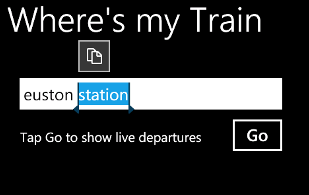
If you single-click a word (or, I presume, tap) then it highlights. Drag corners appear to left and right of the highlighted word, which let you extend or reduce the selection – but only, as far as I can tell, to complete words.

image

Tap the Copy icon which appears above or over the selected words, and a new icon appears above the virtual keyboard indicating that Paste is available.

image

Now you can tap the Paste icon in the same or another application to insert what you have copied.

Curiously, the act of pasting seems to clear the clipboard. I suppose there are not many occasions when you want to paste the same words repeatedly, but it does happen. If you accidentally pasted into the wrong location, for example, you would have to go back, select and copy again.

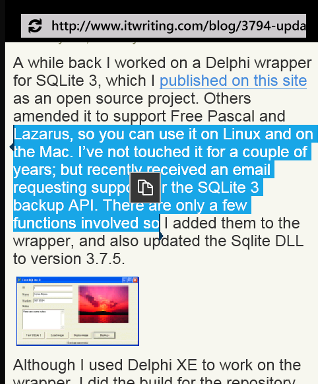
Copy also works in the web browser.

image

It works and it will be useful, though it strikes me as a minimal and slightly annoying implementation.

Server admin on the go with Microsoft’s Windows Phone 7 app for SBS 2011

Microsoft has created a Windows Phone 7 app for managing the forthcoming Small Business Server 2011 Essentials.

The app sends alerts to your home page, and lets you perform certain tasks remotely:

  • View storage status
  • View status of connected computers
  • Start PC backup
  • Enable and disable user accounts
  • Reset user password
  • Reboot server

imageimage

A neat feature for simple server admin, and a bit of stealth marketing for Microsoft’s smartphone, which is struggling to make an impact.

I hope the app has some additional security though. Otherwise, a phone thief could cause mayhem with those few features.

How Microsoft’s Office Web Apps were written in C# and compiled to JavaScript, maybe

While researching another product I came across this 2009 tweet from Microsoft’s Nikhil Kothari:

Office 2010 web apps – perhaps one of the most ambitious script# projects!

Script# is loosely equivalent to the Google Web Toolkit, but whereas GWT compiles Java to JavaScript, Script# compiles C# to JavaScript. According to the site:

Script# is used extensively by developers within Microsoft building Ajax experiences in Windows Live, Office to name just a couple, as well as by a external developers and companies including Facebook.

I had come across the project before, but was waiting to see if would evolve beyond what looks like a personal project for Kothari. It is hosted on http://projects.nikhilk.net rather than on an official Microsoft domain, and the latest release is 0.6.2. In other words, it does not have the look of a project that you would recommend for production work, interesting though it is. Nor is there much public activity around Script# that I can see, though there is a CodePlex site dedicated to improving its JQuery support.

Seeing Kothari’s tweet though raises several questions.

  • Did Microsoft really use it for Office Web Apps, a high profile project which is a key part of Microsoft’s cloud computing strategy?
  • Is there another, more up-to-date version of Script# that is used internally and which may one day burst into the public arena?
  • How might it impact the Silverlight vs HTML5 debate, if Microsoft comes up with a C# to JavaScript compiler in Visual Studio that lets developers code in .NET but deploy to cross-platform JavaScript?

I am sure there are readers of this blog who know more than I do, so by all means let me know.

Server and Tools shine in Microsoft results – so why is Bob Muglia leaving?

Microsoft released quarterly results yesterday:

Quarter ending December 31 2010 vs quarter ending December 31 2009, $millions

Segment Revenue Change Profit Change
Client (Windows + Live) 5054 -2139 3251 -2166
Server and Tools 4390 412 1776 312
Online 691 112 -543 -80
Business (Office) 5126 612 3965 1018
Entertainment and devices 3698 1317 679 314

Microsoft highlighted strong sales for Xbox (including Kinect) as well as for Office 2010, which it said in the press release is the “fastest-selling consumer version of Office in history.”

Why is Office 2010 selling better than Office 2007? My hunch is that this is a Windows 7 side-effect. New Windows, new Office. I do think Office 2010 is a slightly better product than Office 2007, but not dramatically so. SharePoint Workspace 2010, about which I mean to post when I have a moment, is a big disappointment, with a perplexing user interface and limited functionality.

Windows 7 revenue is smaller than that of a year ago, but then again the product was released in October 2009 so this is more a reflection of its successful launch than anything else.

What impressed me most is the strong performance of Server and Tools, at a time when consolidation through virtualisation and growing interest in cloud computing might be reducing demand. Even virtual machines require an OS licence though, so maybe HP should worry more than Microsoft about that aspect.

I still think they are good figures, and make Server and Tools VP Bob Muglia’s announced departure even more puzzling. Just what was his disagreement with CEO Steve Ballmer?

Server and Tools revenue includes Windows Azure, but it sounds like Microsoft’s cloud is not generating much revenue yet. Here is what CFO Peter Klein said:

Moving on to Server and Tools. For Q3 and the full year, we expect non-annuity revenue, approximately 30% of the total, to generally track with the hardware market. Multi-year licensing revenue which is about 50% of the total, and enterprise services, the remaining 20%, should grow high-single digits for the third quarter and low double-digits for the full fiscal year.

This suggests that 80% of the revenue is from licensing and that 20% is “enterprise services” – which as I understand it is the consulting and enterprise support division at Microsoft. So where is Azure?

Online services, which is Bing and advertising, announced another set of dismal results. Another part of Microsoft’s cloud, Exchange and SharePoint online, is lost somewhere in the Business segment. Overall it is hard to judge how well the company’s cloud computing products are performing, but I think it is safe to assume that revenue is tiny relative to the old Windows and Office stalwarts.

Windows Phone 7 gets a mention:

While we are encouraged by the early progress, we realize we still have a lot of work ahead of us, and we remain focused and committed to the long-term success of Windows Phone 7.

It looks like revenue here is tiny as well; and like most corporate assertions of commitment, this is a reflection of the doubts around Microsoft’s mobile strategy overall: how much of it is Windows Phone 7, and how much a future version of full Windows running on ARM system-on-a-chip packages?

Still, these are good figures overall and show how commentators such as myself tend to neglect the continuing demand for Windows and Office when obsessing about a future which we think will be dominated by cloud plus mobile.

How is Windows Azure doing? Few mission critical apps says Microsoft

I attended an online briefing given by Azure marketing man Prashant Ketkar. He said that Microsoft is planning to migrate its own internal systems to Azure, “causing re-architecture of apps,” and spoke of the high efficiency of the platform. There are thousands of servers being managed by very few people he said – if you visit a Microsoft datacenter, “you will be struck by the absence of people.” Some of the efficiency is thanks to what he called a “containerised model”, where a large number of servers is delivered in a unit with all the power, networking and cooling systems already in place. “Just add water, electricity and bandwidth,”, he said, making it sound a bit like an instant meal from the supermarket.

But how is Azure doing? I asked for an indication of how many apps were deployed on Azure, and statistics for data traffic and storage. “For privacy and security reasons we don’t disclose the number of apps that are running on the platform,” he said, though I find that rationale hard to understand. He did add that there are more than 10,000 subscribers and said it is “growing pretty rapidly,” which is marketing speak for “we’re not saying.”

I was intrigued though by what Ketkar said about the kinds of apps that are being deployed on Azure. “No enterprise is talking about taking a tier one mission critical application and moving it to the cloud,” he said. “What we see is a lot of marketing campaigns, we see a lot of spiky workloads moving to the cloud. As the market start to get more and more comfortable, we will see the adoption patterns change.”

I also asked whether Microsoft has any auto-scaling features along the lines of Amazon’s Elastic Beanstalk planned. Apparently it does. After acknowledging that there is no such feature currently in the platform, though third-party solutions are available, he said that “we are working on truly addressing the dynamic scaling issues – that is engineering work that is in progress currently.”

Silverlight native extensions allow deep Windows 7 integration, but forget cross-platform

Microsoft has released Native Extensions for Silverlight, a set of libraries which enable access to Windows 7 features including taskbar Jump Lists; access to attached devices including webcams, cameras and phones; the sensor API for accelerometer support; and even the ability to intercept Windows messages. The ability to intercept Windows messages allows lots of interesting hacks as veteran Visual Basic developers will recall; it was one of the tricks used to overcome limitations in early versions of VB.

The native extensions are only available to out of browser applications running outside the sandbox; the user must consent to trust such applications. Silverlight 4 already had the ability to use COM automation. These new extensions simply build on this existing feature, providing COM automation wrappers for these Windows 7 APIs.

What this means though is that Silverlight developers can create applications that integrate deeply with the Windows 7 desktop and local hardware.

Another way of looking at this is that the subset of Windows applications that can be implemented in Silverlight rather than the full .NET Framework has now increased. It lends some support to the theory which I considered here, that a future version of Silverlight will be the application platform for the Windows 8 app store and for mobile devices running Windows 8. This is speculation though; Microsoft has not said much publicly on the subject. Silverlight is well suited to an app store since installation is easy, updates are near-automatic, and apps are isolated from the rest of the operating system.

The native extensions are Windows 7 only. Forget the Mac, these things do not even work on Windows XP. They only apply to trusted out of browser applications though. Silverlight running in the browser still has similar features on Windows and Mac.

Amazon’s Elastic Beanstalk auto-scales your cloud application

Amazon has announced Elastic Beanstalk, which lets you deploy an application to Amazon’s EC2 (Elastic Compute Cloud) and have it scale up or down, by launching or terminating server instances, according to demand. There is no additional cost for using Elastic Beanstalk; you are charged for the instances you use.

Here is a dialog from the control console that says a lot about how the new service works:

image

As you can see, you can specify both a minimum and a maximum instance count, where the number is between 1 and 10,000. You can also control the “Trigger”, the metric that makes Elastic Beanstalk create or terminate instances.

Currently Elastic Beanstalk is for Java applications running on the Apache Tomcat application server, on a standard Amazon Linux virtual machine. However, the following comment in the FAQ indicates that Amazon is investigating other platforms:

Yes. Elastic Beanstalk is designed so that it can be extended to support multiple development stacks and programming languages in the future.

The innovation here is not so much in the technology, which stiches together a number of existing services, but rather in how easy and cheap it is to get started. The cost of entry is almost nothing; in fact, Amazon says you can run Elastic Beanstalk on its free usage tier, for a low-use application. Even I you expect it to remain low-use Elastic Beanstalk provides some other useful features like health monitoring.

It seems to me that this new service is cloud deployment as it should be: removing the administrative burden of scaling your application according to demand. Other platforms like Google App Engine also do this, but with more restrictions on how you design your application. Platforms like Microsoft Windows Azure let you scale your application, but you have to log into the console and spin instances up or down yourself.

One final observation: despite considerable unhappiness in the Java community about the way Oracle is managing the platform, there are still excellent reasons to use it, and Amazon has just provided one more.

Talk of Windows 8 on an smartphone shows Microsoft’s mobile confusion

During a conference call to discuss Intel’s latest financials, CEO Paul Otellini raised the possibility of putting the full Windows OS onto a smartphone, running a low power Intel SoC (System on Chip). The matter came up with Otellini was asked about the impact of Windows on ARM, announced at CES earlier this month:

The plus for Intel is that as they unify their operating systems we now have the ability for the first time: one, to have a designed-from-scratch, touch-enabled operating system for tablets that runs on Intel that we don’t have today. And secondly, we have the ability to put our lowest-power Intel processors running Windows 8 – or ‘next-generation Windows’ – into phones, because it’s the same OS stack. And I look at that as an upside opportunity for us.

The reasoning seems to be: if Windows 8 is designed to run well on mobile devices with ARM, it will also run well on mobile devices with an Intel SoC, which will let us put it on phones.

Note the point he highlighted: Microsoft unifying its operating systems. No more full Windows vs Windows CE; one OS from mobile to desktop.

Although that sounds compelling, the snag is that Windows is not well suited to low-power mobile devices, which is why Windows CE was invented in the first place. Microsoft can fix this to some extent by fixing the things that make it unsuitable, but it carries a heavy compatibility burden.

It also throws up the question: just what are Microsoft’s long-term plans for Windows Phone 7, which is built on Windows CE, has its own GUI mostly written in native code, and a development platform based on .NET – Silverlight and XNA – plus a native code SDK that only mobile operators and device manufacturers get to use?

At CES Microsoft Steven Sinofsky sort-of denied that Windows will encroach on Windows Phone 7 territory. “Windows Phone 7 is uniquely focused on the small form factor that Windows doesn’t focus on,” he said.

Nevertheless, the company’s decision not to use the Windows Phone 7 OS for tablets may make that inevitable. What is the difference between a smartphone and a small tablet? Does Microsoft expect developers to write apps designed for Windows on a small tablet and then rewrite them for Windows Phone 7 using Silverlight?

It does not make sense; and despite the Windows Phone 7 promotion included in CEO Steve Ballmer’s CES keynote, I was left wondering whether Microsoft’s new mobile OS really has a future.

That said, Silverlight abstracts the OS, so in principle Microsoft could use it to form a consistent mobile development platform irrespective of whether the underlying OS is Windows CE or full Windows. I am not getting that sense from the company though, and I’d expect the primary Windows SDK to remain based on C++.

I am struggling to understand how Microsoft expects this to work. App compatibility is the obvious benefit of full Windows; but two big issues are that most Windows apps are not touch-friendly and are not designed for small screens. Putting Windows on a tablet with a decent screen size and the dreaded stylus works to some extent, but will never compete with Apple’s iPad for usability. On smaller screens most existing apps will not work properly; and if Windows on small devices sprouts a completely new touch-friendly GUI, or borrows the one from Windows Phone 7, then app compatibility with desktop Windows will be limited.

It feels as if Microsoft’s Windows team is saying one thing, the Windows Phone 7 and developer teams saying another, and partners like Intel saying yet another. Windows Phone 7 was meant to be the thing that made belated sense of Microsoft’s mobile strategy, but even that now looks doubtful for the reasons stated above.

Microsoft is still a long way from having a coherent strategy for mobile devices, and that lack is damaging the company and helping Apple and Google to establish their competing operating systems.

Update: Mary-Jo Foley writes about Microsoft “Jupiter” which is a rumoured new user interface and application model designed for Windows 8 and its app store:

Jupiter is going to be a new user interface (UI) library for Windows, built alongside Windows 8. It will be a thin XAML/UI layer on top of Windows application programming interfaces and frameworks for subsystems like graphics, text and input. The idea is Jupiter will bring support for smoother and more fluid animation, rich typography, and new media capabilities to Windows 8 devices.

Is Jupiter a .Net technology, or XAML adapted for native code, or both? Is it one and the same as, say, Silverlight 6? That is not stated, though Senior VP Soma Somasegar helpfully (or not) said that:

some of the information in this post is not right and out of date, not reflecting Microsoft’s current thinking.

That seems to tacitly confirm that it fairly represents Microsoft’s thinking at some time in the not-too-distant past.

It would make sense to me if Microsoft used Silverlight to unify its application platform as mentioned above, and combining the XAML presentation layer with native code could address performance and memory usage concerns with .NET. This is the kind of news that would really give confidence to Silverlight developers, rather than the damage limitation PR that Microsoft has put out since PDC late last year.

On the other hand, I believe Somasegar when he says the information is out of date, so for the time being it is just another dose of uncertainty.