Category Archives: windows

Hardware vendors chase Apple’s iPad at CES with Android, not Windows

There is a chorus of disapproval on the web today as Asus announced a full-fat Windows tablet  (Eee Slate EP121)  at CES in Las Vegas, along with three other devices running Google Android – the Eee Pad MeMo, the Eee Pad Transformer, and the Eee Pad Slider.

The most detailed “review” I’ve seen for the EP121 is on the Windows Experience Blog. Core i5, 4GB RAM, 64GB SSD, capacitive screen with touch and stylus input.

Nice in its way; but no kind of game-changer since this is an echo of early Windows slates which never achieved more than niche success. Four big disadvantages:

  • Short battery life
  • High price
  • The stylus
  • and another thing: in the rush to embrace touch computing, vendors appear to have forgotten one of the best features of those early tablets: you could rest your hand on the screen while writing with the pen. If you have a combined touch/stylus device that will not work.

Microsoft fans will be hoping CEO Steve Ballmer does not make too much of the EP121 and devices like this in tonight’s keynote. If he does, it will seem the company has learned little from failures of the past.

Asus deserves respect for introducing the netbook to the world in 2007, with the original Eee PC. It ran Linux, had an SSD in place of a hard drive, battery life was good, and above all it was light and cheap. Back then the story was how Microsoft missed the mark with its 2006 Origami project – small portable PCs running Windows – only to be shown how to do it by OEMs with simple netbooks at the right price.

Asus itself is not betting on Windows for tablet success; after all, three of the four products unveiled yesterday run Android. Despite what was apparently a poor CES press conference these may work out OK, though the prices look on the high side.

There will be many more tablets announced at CES, most of them running Android. Android “Honeycomb”, which is also Android 3.0 if Asus CEO Johnny Shih had his terminology right, is the first version created with tablet support in mind.

But why the tablet rush? The answer is obvious: it is because Apple has re-invented the category with the iPad. Since the iPad has succeeded where the Tablet PC failed, as a mass-market device, intuitively you would expect vendors to study what is right about it and to copy that, rather than repeating past mistakes. I think that includes long battery life and a touch-centric user interface; keyboard or stylus is OK as an optional extra but no more than that.

Equalling Apple’s design excellence and closed-but-seamless ecosystem is not possible for most manufacturers, but thanks to Android they can come up with devices that are better in other aspects: cheaper, more powerful, or with added features such as USB ports and Adobe Flash support.

It is reasonable to expect that at least a few of the CES tablets will succeed as not-quite iPads that hit the mark, just as Smartphones like the HTC Desire and Motorola Droid series have done with respect to the iPhone.

Microsoft? Ballmer’s main advantage is that expectations are low. Even if he exceeds those expectations, the abundance of Android tablets at CES shows how badly the company misjudged and mishandled the mobile market.

The implication for developers is that if you want app ubiquity, you have to develop for Android and iOS.

Microsoft could help itself and its developers by delivering a cross-platform runtime for the .NET Framework that would run on Android. I doubt Silverlight for Android would be technically difficult for Microsoft; but sadly after PDC it looks unlikely.

Ten big tech trends from 2010

This was an amazing year for tech. Here are some of the things that struck me as significant.

Sun Java became Oracle Java

Oracle acquired Sun and set about imposing its authority on Java. Java is still Java, but Oracle lacks Sun’s commitment to open source and community – though even in Sun days there was tension in this area. That was nothing to the fireworks we saw in 2010, with Java Community Process members resigning, IBM switching from its commitment to the Apache Harmony project to the official OpenJDK, and the Apache foundation waging a war of words against Oracle that was impassioned but, it seems, futile.

Microsoft got cloud religion

Only up to a point, of course. This is the Windows and Office company, after all. However – and this is a little subjective – this was the year when Microsoft convinced me it is serious about Windows Azure for hosting our applications and data. In addition, it seems to me that the company is willing to upset its partners if necessary for the sake of its hosted Exchange and SharePoint – BPOS (Business Productivity Online Suite), soon to become Office 365.

This is a profound change for Microsoft, bearing in mind its business model. I spoke to a few partners when researching this article for the Register and was interested by the level of unease that was expressed.

Microsoft also announced some impressive customer wins for BPOS, especially in government, though the price the customers pay for these is never mentioned in the press releases.

Microsoft Silverlight shrank towards Windows-only

Silverlight is Microsoft’s browser plug-in which delivers multimedia and the .NET Framework to Windows and Mac; it is also the development platform for Windows Phone 7. It still works on a Mac, but in 2010 Microsoft made it clear that cross-platform Silverlight is no longer its strategy (if it ever was), and undermined the Mac version by adding Windows-specific features that interoperate with the local operating system. Silverlight is still an excellent runtime, powerful, relatively lightweight, easy to deploy, and supported by strong tools in Visual Studio 2010. If you have users who do not run Windows though, it now looks a brave choice.

The Apple iPad was a hit

I still have to pinch myself when thinking about how Microsoft now needs to catch up with Apple in tablet computing. I got my first tablet in 2003, yes seven years ago, and it ran Windows. Now despite seven years of product refinement it is obvious that Windows tablets miss the mark that Apple has hit with its first attempt – though drawing heavily on what it learnt with the equally successful iPhone. I see iPads all over the place, in business as well as elsewhere, and it seems to me that the success of a touch interface on this larger screen signifies a transition in personal computing that will have a big impact.

Google Android was a hit

Just when Apple seemed to have the future of mobile computing in its hands, Google’s Android alternative took off, benefiting from mass adoption by everyone-but-Apple among hardware manufacturers. Android is not as elegantly designed or as usable as Apple’s iOS, but it is close enough; and it is a relatively open platform that runs Adobe Flash and other apps that do not meet Apple’s approval. There are other contenders: Microsoft Windows Phone 7; RIM’s QNX-based OS in the PlayBook; HP’s Palm WebOS; Nokia Symbian and Intel/Nokia MeeGo – but how many mobile operating systems can succeed? Right now, all we can safely say is that Apple has real competition from Android.

HP fell out with Microsoft

Here is an interesting one. The year kicked off with a press release announcing that HP and Microsoft love each other to the extent of $250 million over three years – but if you looked closely, that turned out to be less than a similar deal in 2006. After that, the signs were even less friendly. HP acquired Palm in April, signalling its intent to compete with Windows Mobile rather than adopting it; and later this year HP announced that it was discontinuing its Windows Home Server range. Of course HP remains a strong partner for Windows servers, desktops and laptops; but these are obvious signs of strain.

The truth though is that these two companies need one another. I think they should kiss and make up.

eBook readers were a hit

I guess this is less developer-oriented; but 2010 was the year when electronic book publishing seemed to hit the mainstream. Like any book lover I have mixed feelings about this and its implications for bookshops. I doubt we will see books disappear to the same extent as records and CDs; but I do think that book downloads will grow rapidly over the next few years and that paper-and-ink sales will diminish. It is a fascinating tech battle too: Amazon Kindle vs Apple iPad vs the rest (Sony Reader, Barnes and Noble Nook, and others which share their EPUB format). I have a suspicion that converged devices like the iPad may win this one, but displays that are readable in sunlight have special requirements so I am not sure.

HTML 5 got real

2010 was a huge year for HTML 5 – partly because Microsoft announced its support in Internet Explorer 9, currently in beta; and partly because the continued growth of browsers such as Mozilla Firefox, and the WebKit-based Google Chrome, Apple Safari and numerous mobile browsers showed that HTML 5 would be an important platform with or without Microsoft. Yes, it is fragmented and unfinished; but more and more of HTML 5 is usable now or in the near future.

Adobe Flash survived Apple and HTML 5

2010 was the year of Steve Jobs’ notorious Thoughts on Flash as well as a big year for HTML 5, which encroaches on territory that used to require the services of a browser plug-in. Many people declared Adobe Flash dead, but the reality was different and the company had a great year. Apple’s focus on design and usability helps Adobe’s design-centric approach even while Apple’s refusal to allow Flash on its mobile computers opposes it.

Windows 7 was a hit

Huge relief in Redmond as Windows 7 sold and sold. The future belongs to mobile and cloud; but Windows is not going away soon, and version 7 is driving lots of upgrades as even XP diehards move over. I’m guessing that we will get first sight of Windows 8 in 2011. Another triumph, or another Vista?

Remote access to files in Microsoft Small Business Server 2011

Among the most interesting features in the new Small Business Server 2011 standard edition – I suspect it is in the Essentials version as well – is the ability to access shared folders remotely via a web application.

This is actually a feature borrowed from Windows Home Server, which also exposes shared folders in its remote access web application.

Note this is different from SharePoint, which is also available in SBS. SharePoint stores files in a SQL Server content database and publishes them in document libraries. Shared Folders by contrast are simple file shares. Although they lack the rich features of SharePoint, such as discussions, or check in and check out, they are faster and more convenient when all you want to do is to share files. Another benefit is that on the local network you can access shared folders directly with Windows Explorer. This can also be done with SharePoint, but under the covers it uses WebDAV – web distributed authoring and versioning – which is slower and can be tricky to get working, especially on Windows XP. SharePoint is also less suitable for files of types that it does not recognise, whereas a shared folder will accept anything you care to put into it.

While these may seem subtle distinctions, in practice they are not, and the matter of SharePoint versus shared folders is one that some businesses struggle with.

Now that you can publish shared folders through the Remote Web Access web site, this issue will be less pressing, since remote access without the need for VPN (virtual private network) is often the key reason for moving files into SharePoint.

The Remote Web Access site is not itself a SharePoint site; it is an ASP.NET application that you can find in C:\Program Files\Windows Small Business Server\Bin\WebApp\RemoteAccess. I noticed two ASP.NET user controls, one called filesgadget.ascx and one called richupload.ascx.

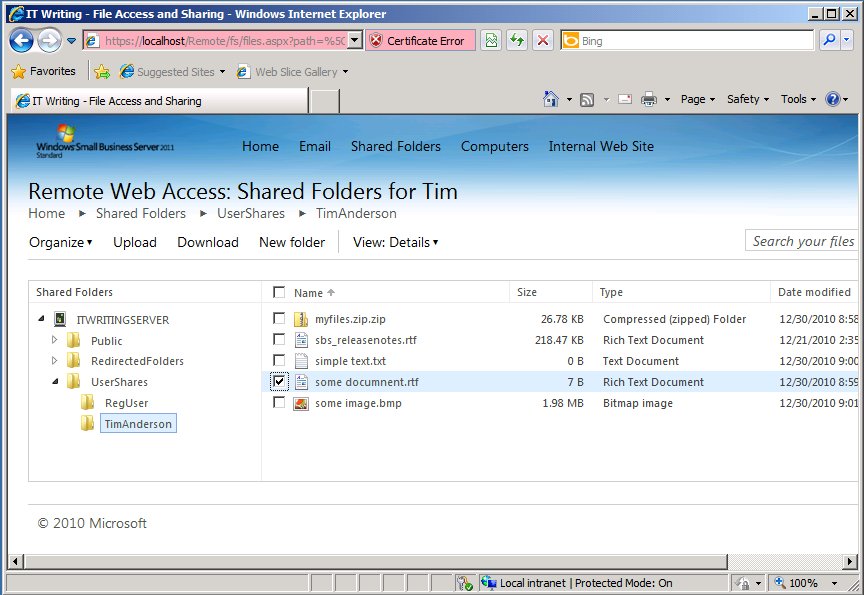
If you browse to this site, you can access folders and files in the SBS Shares to which you have access, controlled by NTFS permissions. The file sharing application will pick up any shared folders on the server. When you open a folder, the files are listed in the browser with options to upload, download, delete, rename, copy, cut or paste.

image

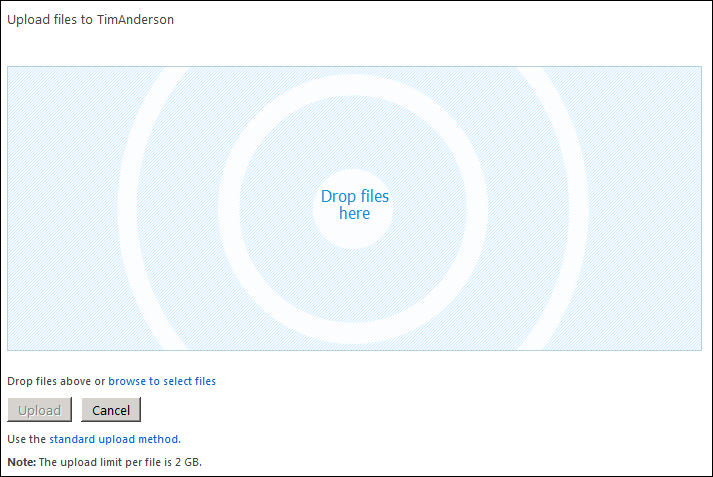
If you choose Upload, you can add documents by dragging them into the browser.

image

I also tried the site in Google Chrome. It worked, though not the drag-and-drop file upload. You can still upload files using a standard file chooser.

This looks to me like a great and overdue feature for Small Business Server. The only snag I can foresee is that some users may still find the SharePoint vs Shared Folder choice confusing and wonder why documents in the “Internal web site” are presented differently and with more features than those in shared folders. It may still be difficult to decide which to use; but at least the choice will no longer be driven solely by whether remote access via the browser is required.

What you read in 2010: top posts on ITWriting.com

With three days to go, traffic on ITWriting.com in 2010 is more than 50% up over that of 2009 with over 1 million unique visitors for the first time. Thank you for your attention in another crazy year in technology.

So what did you read? It is intriguing to look at the stats for the whole year, which are different in character from stats for a week or month. The reason is that over a short period, it is the news of the day that is most read – posts like The Java Crisis and what it means for developers. Over the year though, it is the in-depth technical posts like How to backup Small Business Server 2008 on Hyper-V that draw more readers, along with those posts that are a hit with people searching Google for help with an immediate problem like Cannot open the Outlook window – what sort of error message is that?

The most-read post in 2010 though is in neither category. In July I made a quick post noting that the Amazon Kindle now comes with a web browser based on WebKit and a free worldwide internet connection. Mainly thanks to some helpful comments from users it has become a place where people come for information on that niche subject.

On the programming side, posts about Microsoft’s changing developer story are high on the list:

Lessons from Evernote’s flight from .NET

Microsoft wrestles with HTML5 vs Silverlight futures

Microsoft’s Silverlight dream is over

Another post which is there in the top twenty is this one about Adobe Flash and web services:

SOA, REST and Flash/Flex – why Flash does not PUT

along with this 2009 post on the pros and cons of parallel programming:

Parallel Programming: five reasons for caution. Reflections from Intel’s Parallel Studio briefing

This lightweight post also gets a lot of hits:

Apple iPad vs Windows Tablet vs Google Chrome OS

It is out of date now and I should do a more considered update. Still, it touches on a big theme: the success of the Apple iPad. When you take that alongside the interest in Android tablets, perhaps we can say that 2010 was the year of the tablet. I first thought the tablet concept might take off back in 2003/2004 when I got my first Acer tablet. I was wrong about the timing and wrong about the operating system; but the reasons why tablets are a good idea still apply.

Watching these trends is a lot of fun and I look forward to more surprises in 2011.

Fixing a slow Windows XP PC

Yesterday I investigated a Windows XP machine that had become so slow it was unusable. It was a Dell Dimension 2350 with 1GB RAM and a 2.00 Ghz Celeron CPU – not too bad a spec for XP – that had been out of use for a while and was being brought back into service for a specific and undemanding task. At first it had performed fine, but after applying Service Pack 3 and installing Microsoft Security Essentials it had ground almost to a halt. The machine performed so badly that trying to troubleshoot it was like wading through glue. You could get task manager up and see plenty of RAM free, but the CPU was stuck on 100%.

After trying a few futile things like updating the BIOS, I installed Process Explorer and Process Monitor from Sysinternals. Looking at the activity summary in Proccess Monitor it was obvious which process was to blame: an instance of svchost.exe started with the command line: c:\windows\system32\svchost.exe –k netsvcs

However, netsvcs is responsible for many different services. I did a bit more poking around with Process Explorer and found the culprit: Windows Automatic Updates. Typing:

net stop wuauserv

at a command prompt fixed the problem temporarily.

It appears that the Windows Update database, which you can find in %windir%\Software Distribution\DataStore, can get corrupted. The Windows Update service goes into a spin and consumes all your computing resources. You can turn Automatic Updates off by right-clicking My Computer, Properties, and Automatic Updates tab; or you can fix it the brute-force way by deleting the DataStore folder and letting Windows recreate it, though you lose your update history; or you can try to repair the database.

Of course there are many reasons why Windows XP might run slowly, and often it is not easy to troubleshoot. There is abundant well-meaning advice on the internet, much of it based on the assumption that malware is involved, but finding the right answer to a particular problem is a matter of luck. In a professional context, it is hardly worth the time and corporates will just re-image the machine.

I do find it interesting that when Windows XP first appeared in 2001 it specified a minimum of 64MB RAM and ran OK in 128MB. Once fully patched with Service Pack 3, automatic updates, Internet Explorer 8 and anti-virus, it needs at least 512MB and in my experience 1GB to be comfortable. Unfortunately you have little choice; if you want to connect to the Internet or run recent applications, you have to update it. Automatic updates is a also a near-essential security feature.

Finally, kudos to the Sysinternals team whose tools are invaluable for solving this kind of problem.

Why Windows Installer pops up when you run an application

Warning: this post is about old Windows hassles; I’ve written it partly because some of us still need to run old versions of Windows and apps, and partly because it reminds me that Windows has in fact improved so that this sort of thing is less common, though there is still immense complexity under its surface which can leak out to cause you grief – especially for people like reviewers and developers who install lots of stuff.

I’ve been retreating to Windows XP recently, in order to tweak an old Visual Basic 6 application. VB6 can be persuaded to run on later versions of Windows, but it is not really happy there. I have an old XP installation that I migrated from a physical machine to a VM on Hyper-V.

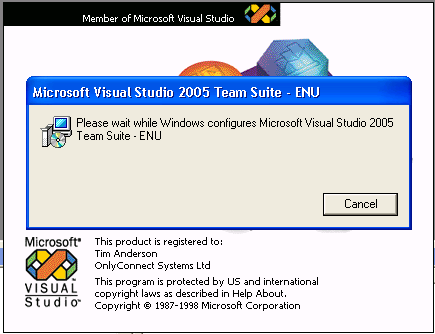
I was annoyed to find that when I fired up VB 6, the Windows Installer would pop up – not for VB 6, but for Visual Studio 2005, which was also installed.

image

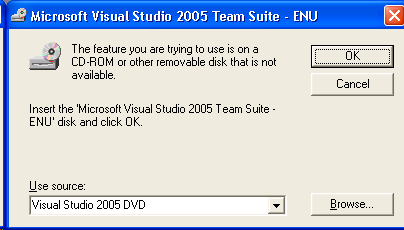
Worse still, after thrashing away for a bit it decided that it needed the original DVD:

image

I actually found the DVD and stuck it in. The installer ground away for ages with its deceptive progress bars – “20 seconds remaining” sitting there for 10 minutes – repeated what looked like a loop several times, then finally let me in to VB. All was well for the rest of that session; but after restarting the machine, if I started VB 6 the very same thing would happen again.

This annoyance is not confined to VB 6; it used to happen a lot in XP days, though in my experience it is much less common with Vista and Windows 7.

I investigated further. This article explains what happens:

What you see is the auto-repair feature of Windows Installer. When an application is launched, Windows Installer performs a health check in order to restore files or registry entries that may have been deleted. Such a health check is not only triggered by clicking a shortcut but also by other events, such as activation of a COM server. The events triggering a health check depend on the operating system.

When you see this auto-repair problem this means that Windows Installer came to the conclusion that some application is broken and needs to be repaired.

A good concept, but in practice one that often fails and causes frustration. The worst part of it is the lack of information. Look at the dialog above, which refers to “the feature you are trying to use”. But which feature? In my case, how can my VB 6 depend on a feature of Visual Studio 2005, which came later and does not include VB 6? In any case, it is a lie, since VB 6 works fine even after the installer fails to fix its missing feature.

Fortunately, the article explains how to troubleshoot. You go to the event viewer, application tab, and MsiInstaller entries will tell you which product and component raised the repair attempt. Unfortunately the component is identified by a GUID. What is it?

To find out, you can try Google, or you can use a utility that queries the Windows Installer database. The best I’ve found is a tool called msiinv; the script mentioned in the post above did not work. You can find msiinv described by Aaron Stebner here, with a download link. Note how Stebner had to change the download locations because they kept breaking; a constant frustration with troubleshooting Windows, as Microsoft regularly moves or removes articles and downloads even when they are still useful.

Running msiinv with its verbose option (which you will need) seems to pretty much dump the entire msi installer database to a text file. You can then search for these GUIDs and find out what they are. You may find even products listed that are not in Control Panel’s Add/Remove programs. You can remove these from the command line like this:

msiexec /x {GUID}

where GUID identifies the product to remove.

In my case I found beta versions of WinFX (which became .NET 3.0). I said this was old stuff! I removed them, restarted Windows, and VB6 started cleanly.

That still does not explain how they got hooked to VB6; the answer is probably somewhere in the msiinv output, but having fixed the issue I’m not inclined to spend more time on it.

Wrestling with Microsoft SharePoint

I do not know what to think about Microsoft SharePoint. It is kind-of inevitable if you live on the Microsoft platform. At some point the question comes up: how do we get to our documents over the Internet; and while VPN works, it is an awkward solution that means opening a VPN tunnel first and arguably opens up too much from a security perspective; direct internet access is easier and works from any device. Microsoft also has Direct Access, which lets you connect to network shares without a VPN; I have not tried it though it requires Windows 7 which is a serious restriction.

In any case, SharePoint does so much more: search, blogs and wikis, company portal, business intelligence, platform for document workflow applications, office web apps for in-browser editing of Office documents, alerts when documents are added or changed, and near-infinite possibilities for customization, to mention a few features.

The downside is that SharePoint is intricate, sometimes slow, and complex to administer.

I run a miniature Microsoft-platform setup for test and development. The servers are on Hyper-V virtual machines, and include Exchange 2007 (2010 upgrade pending), SharePoint 2010, and ISA Server 2006. I have been trying out SharePoint for some time, and once I figured out how to map a drive reliably I have enjoyed using it as a document repository. I have also tried SharePoint WorkSpace 2010 on a netbook, which is useful for offline work, though the user interface needs attention and it has an annoying limit on the number of items it will download.

The problem I have had though is that the internal URL (eg http://sharepoint) was different from the external URL (eg https://sharepoint.mydomain.com). In consequence, it did not work smoothly on a laptop or netbook that is not always on the internal network.

I spent some time fixing this. I am not sure that I found the best solution, but I found one that works. I extended the SharePoint application to a second web site for ssl access; I set up split DNS so that sharepoint.mydomain.com resolves to the internal server on the local network, and to ISA on the internet; I set up a new listener in ISA for the external URL, and a new policy that redirects to the internal server using SSL throughout; I turned off link translation; I removed all the paths except for /*; I set NTLM authentication. Finally I set Alternate Access Mappings for the new external URL which, thanks to split DNS, also works internally.

If that sounds like jargon, welcome to the world of SharePoint administration. Few things are intuitive or straightforward; which is why, for example, you can find a three part series by the Troy Starr on What every SharePoint administrator needs to know about Alternate Access Mappings.

Another thing that is obvious to SharePoint admins but not to occasional visitors: when you patch SharePoint with an official update, it is not enough to run the patch. You also have to update the configuration with psconfig -update or the configuration wizard, to update the metadata.

And after all that, in my very simple SharePoint setup, I still have warnings in Health Analyzer about missing server side dependencies for WebPart class [8d6034c4-a416-e535-281a-6b714894e1aa] – I am not sure why the Analyzer cannot look up the GUID somewhere and present something more meaningful, nor why the “More information about this rule” link in the analyzer takes you to the SharePoint Server home page rather than anywhere useful.

That said, I am pleased with my setup. It makes getting at documents when out and about very easy, particularly with mapped drive integration. I also found several iPhone clients – Steve McDonnell has a round up – and installed the free Moprise to get started. Performance is rather good; and while it has little advantage over Dropbox for an individual, in a corporate environment it makes sense.

My immediate conclusion is that specialising in SharePoint consultancy and administration is probably a smart move if you have the requisite skills; but that tinkering with SharePoint is something non-specialists are unlikely to enjoy. Shifting the administrative burden to Microsoft by using its hosted SharePoint is attractive, as is using an alternative collaboration and document platform such as Google Apps, though the two platforms are not very alike.

The top Silverlight feature request: implement on more platforms

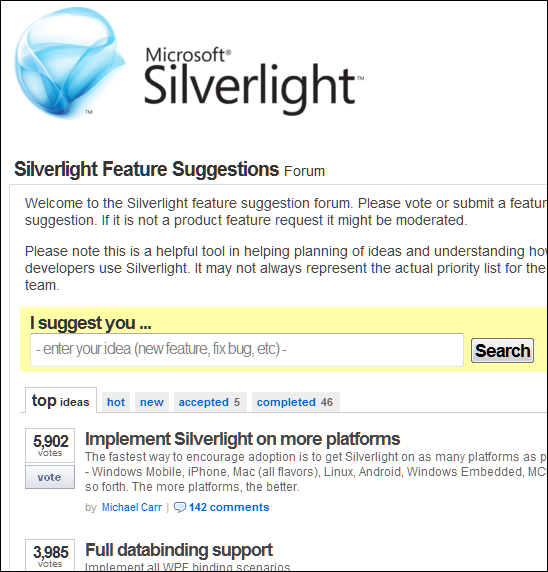
One of the things mentioned by Microsoft VP Scott Guthrie in his Firestarter keynote yesterday was that Silverlight 5, the new version set for release in 2011, implements some 70% of what users have voted for. I presume he means the feedback forum here. But look what the top request is – as noted by a comment to yesterday’s post:

image

Looking at the comments, Android is a common request, and relatively easy for Microsoft to achieve given the open nature of that platform.

This was apparently not part of the 70% though. Instead, Guthrie introduced more Windows-only features – showing that concerns about divergence between Windows and Mac implementations when Microsoft announced COM support at the 2009 PDC were justified.

What if Microsoft had purchased Novell, or purchased Mono from Novell, instead of letting it go to Attachmate? It would have enabled Microsoft to unify the Windows and Linux implementations as well as building on the work the Mono team has done on compilation for iOS.

That dream is over though; the Silverlight application strategy seems focused on making it better for Windows-platform corporations.

Migrating from physical to virtual with Hyper-V and disk2vhd

I have a PC on which I did most of my work for several years. It runs Windows XP, and although I copied any critical data off it long ago, I still wheel it out from time to time because it has Visual Studio 6 and Delphi 7 projects with various add-ins installed, and it is easier to use the existing PC than to replicate the environment in a virtual machine.

These old machines are a nuisance though; so I thought I’d try migrating it to a virtual machine. There are numerous options for this, but I picked Microsoft Hyper-V because I already run several test servers on this platform with success. Having a VM on a server rather than on the desktop with Virtual PC, Virtual Box or similar means it is always easily available and can be backed up centrally.

The operation began smoothly. I installed the free Sysinternals utility Disk2vhd, which uses shadow copy so that it can create a VHD (virtual hard drive) from the system on which it is running. Next, I moved the VHD to the Hyper-V server and created a new virtual machine set to boot from that drive.

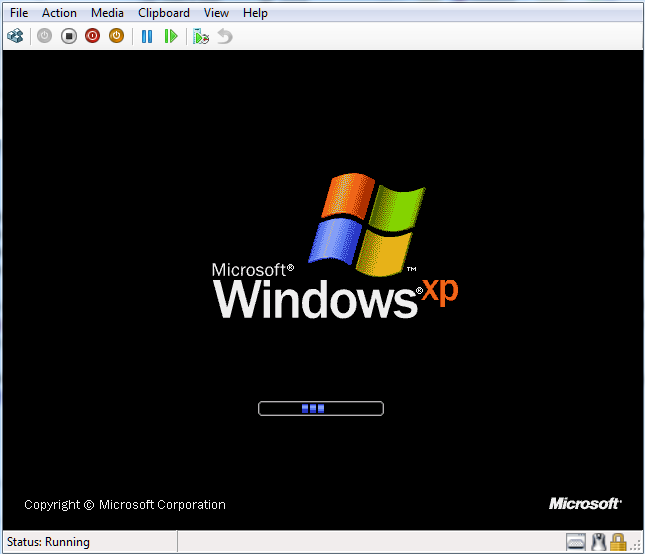
Windows XP started up first time without any blue screen problems, though it did ask to be reactivated.

image

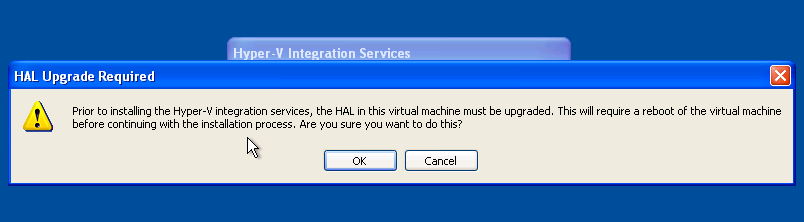
I could not activate yet though, because XP could not find a driver for the network card. The solution was to install the Hyper-V integration services, and here things started to go wrong. Integration services asked to upgrade the HAL (Hardware Abstraction Layer), a key system DLL:

image

However, on restart I got the very same dialog.

Fortunately I was not the first to have this problem. I was prepared for some hassle and had my XP with SP3 CD ready, so I copied and expanded halaacpi.dll from this CD to my system32 folder and amended boot.ini as suggested:

multi(0)disk(0)rdisk(0)partition(2)\WINDOWS=”Disk2vhd Microsoft Windows XP Professional” /FASTDETECT /NOEXECUTE=OPTIN /HAL=halaacpi.dll

I rebooted and now the integration services installed OK. However, if you do this then I suggest your delete the /HAL=halaacpi.dll argument before rebooting again, as with this in place Windows would not start for me.  In fact, you can delete the special Disk2vhd option in boot.ini completely; it is no longer needed.

After that everything was fine – integration worked, the network came to life and I activated Windows – but performance was poor. To be fair, it was not that good in hardware either. Still, I am working on it. I’ve given the Virtual Machine 1.5GB RAM and dual processors. Removing software made obsolete by the migration, things like the SoundMAX and NVIDIA drivers seemed to help quite a bit. It is usable, and will improve as I fine-tune the setup.

Overall, the process was easier than I expected and getting at my old developer setup is now much more convenient.

As Microsoft releases new tools for Windows Phone, developers ask: how is it selling?

Microsoft has released Visual Basic for Windows Phone Developer Tools – not a lot to report, I guess, except that what you could already do in C# you can now also do in Visual Basic.

Still, when someone at Microsoft asked me what I thought of the Windows Phone 7 developer platform I replied that the tools look good for the most part – though I would like to see a native code option and it seems unfortunate that mobile operators can install native code apps but the rest of us officially cannot – but the bigger question is around the size of the market.

We all know that a strong and large community of developers is critical to the success of a platform – but as I’ve argued before, developers will go where their customers are, rather than selecting a platform based on the available tools and libraries. It is a bit of both of course: the platform has to be capable of running the application, and ease of development is also a factor, but in the end nothing attracts developers more than a healthy market.

Therefore the critical question for developers is how well Windows Phone 7 is selling.

Nobody quite knows, though Tom Warren makes the case for not much more than 126,000, that being the number of users of the Windows Phone Facebook application.

I’m not quite convinced when Warren says:

It’s likely that most users will connect their Facebook account so the statistics could indicate nearly accurate sales figures.

Not everyone loves Facebook; and when I was trying out Windows Phone 7 I found myself reluctant to have it permanently logged in. Even so, I’d agree that well over 50% of users will enable Facebook integration so it is a useful statistic.

Although that suggests a relatively small number in the context of overall Smartphone sales, my perception is that lack of availability is part of the reason, so it is too early to judge the platform’s success. I do not see many Windows Phone 7 in the mobile phone shops that I pass in the UK; in fact it is unusual to see it at all. I am not sure if this is mainly because of supply shortages, or because Microsoft and its partners found it difficult to build expectations in the trade that this would be a sought-after device, or both.

Some bits of anecdotal evidence are encouraging for Microsoft. Early adopters seem to like it well enough. Nevertheless, it is a minority player at the moment and that will not change soon.

Developers are therefore faced with a small niche market. Microsoft has done a fair job with the tools; now it needs to get more devices out there, to convince developers that once they have built their applications, there are enough customers to make it worth while.